Boneworks VR Review: Physics-Based VR Gaming Innovation
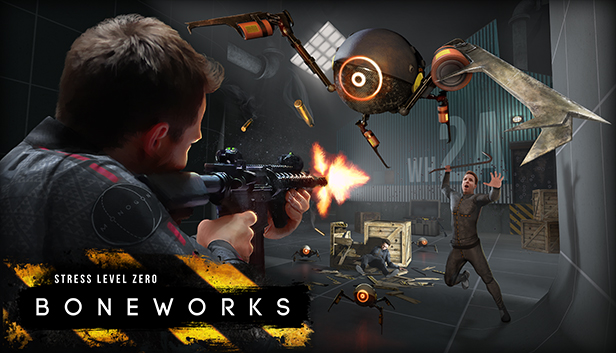
Imagine a world where virtual reality isn't just about seeing and hearing, but about truly interacting. Where every object has weight, every movement has consequence, and the laws of physics reign supreme. Boneworks promises this level of immersion, but does it deliver a truly revolutionary VR experience, or does it stumble under the weight of its ambition?
Many VR games offer compelling visuals and sound, but the interaction often feels shallow. Objects might as well be glued in place, and your movements are often translated into simple on/off switches. This lack of genuine physical interaction can break the sense of presence and pull you out of the virtual world.
This review aims to explore whether Boneworks successfully bridges the gap between virtual and physical interaction. We'll delve into its innovative physics-based mechanics, assess its gameplay, and ultimately determine if it's a must-have title for VR enthusiasts or a flawed experiment.
Boneworks attempts to revolutionize VR gaming through its advanced physics engine. The game boasts unprecedented levels of interaction, allowing players to manipulate almost every object in the environment with realistic weight and consequences. While ambitious, this system can be both immersive and frustrating. The combat is visceral and engaging, but the learning curve is steep. Ultimately, Boneworks is a groundbreaking, if imperfect, step towards a more physically interactive VR future.
The Thrill of Physics-Based Combat
The promise of physics-based combat was what truly drew me to Boneworks. I remember the first time I picked up a pipe wrench and swung it at a Nullbody. The weight of the wrench felt real, the impact had a satisfying crunch, and the enemy reacted believably. It was a far cry from the weightless, animation-driven combat of most VR titles. That initial excitement fueled my determination to master the game's unique control scheme. It wasn't easy. There were moments of pure frustration, like when I couldn't climb a simple ladder because my avatar's hands wouldn't grip properly. Or when I got stuck in a doorway because my virtual body collided awkwardly with the environment. But even these moments had a strange appeal. They highlighted the game's commitment to realism. Each success, each perfectly executed swing, felt earned. I felt a sense of accomplishment that I rarely experience in other games. Learning to manage my avatar's weight, momentum, and the physics of the environment became a game in itself. I felt like I was learning a new skill, like I was actually interacting with the virtual world in a meaningful way. The physics-based systems extend beyond combat, influencing traversal, puzzle-solving, and even simple object manipulation. This is what makes Boneworks such a unique and immersive experience. It requires patience, experimentation, and a willingness to embrace the chaos that comes with a truly dynamic virtual environment.
Understanding the Avatar System
Boneworks' avatar system is central to its gameplay, and it's arguably the most divisive aspect of the game. Unlike most VR games, where your character is simply a floating camera with hands, Boneworks gives you a full virtual body with realistic weight and proportions. This means your movements directly translate into your avatar's actions, and your physical position in the real world affects your character's stability and balance in the game. This approach allows for a level of immersion rarely seen in VR. You can physically duck behind cover, lean around corners, and climb objects with a satisfying sense of physicality. However, it also introduces a new level of complexity and challenge. Mastering the avatar system requires practice and a good understanding of how your movements translate into the virtual world. You need to learn to manage your weight, momentum, and center of gravity to navigate the environment effectively. Some players find this system clunky and frustrating, especially at first. They struggle to climb, jump, or even walk smoothly. Others, however, appreciate the added realism and the sense of accomplishment that comes with mastering the game's unique controls. The avatar system is deeply intertwined with the physics engine. Every object you interact with has weight and inertia, and your avatar must react realistically to these forces. This creates a dynamic and unpredictable environment where even simple tasks can become challenging.
The Lore and Mysteries of Myth OS
Beyond the physics-based gameplay, Boneworks boasts a surprisingly intriguing lore and a mysterious narrative. The game takes place within Myth OS, a massive virtual reality construct created by the enigmatic company Monogon. As you progress through the game, you uncover fragments of information about Myth OS's history, its purpose, and the events that led to its current state of disarray. The narrative is presented in a cryptic and non-linear fashion, encouraging players to explore the environment and piece together the story themselves. The game is filled with hidden clues, secret areas, and cryptic messages that hint at a deeper, more complex plot. Some players have dedicated countless hours to deciphering the game's lore and unraveling its mysteries. The Monogon company is a central element of the narrative, and its motives remain shrouded in secrecy. The game suggests that Monogon was experimenting with artificial intelligence, virtual reality, and potentially even consciousness transfer. The player character, Arthur Ford, is a key figure in these experiments, and his actions seem to have had a significant impact on the fate of Myth OS. The lore also touches upon themes of identity, reality, and the nature of consciousness. Boneworks challenges players to question what is real and what is virtual, and it explores the potential consequences of blurring the lines between the two. The game's lore is not simply a backdrop to the gameplay; it's an integral part of the experience that adds depth, intrigue, and a sense of purpose to the player's actions.
Uncovering Hidden Secrets and Easter Eggs
Boneworks is rife with secrets and easter eggs, rewarding curious players who take the time to explore its intricately designed levels. Hidden areas, concealed passages, and cleverly placed objects often lead to unexpected discoveries, ranging from new weapons and items to cryptic messages and lore fragments. The game encourages experimentation and rewards players who think outside the box. Many puzzles require creative use of the physics engine, forcing players to manipulate objects and environments in unconventional ways. Some secrets are so well-hidden that they have only been discovered after months of dedicated searching by the community. The game's developers have also included numerous easter eggs that reference other games, movies, and pop culture phenomena. These references add a layer of humor and nostalgia to the experience, further enhancing the game's appeal to dedicated fans. Uncovering these secrets requires a keen eye for detail, a willingness to experiment, and a healthy dose of perseverance. The game's physics engine often plays a crucial role in discovering these hidden areas. Players must use their knowledge of the game's mechanics to manipulate objects, create makeshift platforms, and exploit glitches in the environment. The sense of accomplishment that comes with uncovering a well-hidden secret is incredibly satisfying. It feels like you've truly mastered the game's mechanics and gained a deeper understanding of its world. The community surrounding Boneworks has played a vital role in uncovering the game's secrets. Players share their discoveries online, collaborate to solve puzzles, and develop new strategies for exploring the environment.
Is Boneworks Worth Playing? A Recommendation
Whether or not Boneworks is worth playing ultimately depends on your tolerance for jank and your appreciation for innovative gameplay. If you're looking for a polished, bug-free VR experience, Boneworks might not be for you. The game is known for its occasional glitches, awkward physics interactions, and steep learning curve. However, if you're willing to overlook these flaws and embrace the game's unique challenges, you'll find a truly rewarding and immersive VR experience. Boneworks is a groundbreaking title that pushes the boundaries of what's possible in VR gaming. Its physics-based mechanics offer a level of interaction and realism rarely seen in other games. The combat is visceral and engaging, the puzzles are challenging and creative, and the lore is intriguing and mysterious. If you're a VR enthusiast who's looking for something different, something that will challenge your skills and push your expectations, Boneworks is definitely worth a look. Be prepared for a bumpy ride, but also be prepared to be amazed. The game's initial frustration is often followed by moments of pure VR bliss. The feeling of swinging a weapon with realistic weight, climbing a virtual wall with your own two hands, or solving a complex puzzle using the game's physics engine is unlike anything else in VR. Ultimately, Boneworks is a game that rewards patience, experimentation, and a willingness to embrace the chaos that comes with a truly dynamic virtual environment.
The Future of Physics-Based VR
Boneworks serves as a proof of concept for the future of physics-based VR gaming. It demonstrates the potential for creating more immersive and engaging virtual experiences by incorporating realistic physics interactions. While Boneworks is not without its flaws, it has paved the way for future developers to build upon its innovations and create even more compelling physics-based VR titles. The challenges of implementing realistic physics in VR are significant. It requires powerful hardware, sophisticated algorithms, and a deep understanding of human perception. However, the potential rewards are immense. Physics-based VR can create a sense of presence and immersion that is simply not possible with traditional VR games. Imagine a VR game where you can build structures out of individual blocks, manipulate objects with realistic weight and inertia, or even simulate complex physical phenomena like fluid dynamics or explosions. The possibilities are endless. As VR technology continues to evolve, we can expect to see more and more games incorporating physics-based mechanics. These games will likely focus on refining the existing systems, improving performance, and addressing the challenges of user input and comfort. The future of physics-based VR is bright. It has the potential to revolutionize the way we interact with virtual worlds and create experiences that are both incredibly immersive and deeply engaging. Boneworks is just the beginning.
Essential Tips and Tricks for New Players
Starting Boneworks can be daunting. The physics-based system is unlike anything else in VR, and it takes time to adjust. Here are a few essential tips and tricks to help you get started. First, get comfortable with the movement system. Practice walking, jumping, and climbing in the game's sandbox mode before diving into the campaign. Experiment with different movement styles to find what works best for you. Second, learn to manage your weight and momentum. Your avatar's movements are affected by its weight and inertia, so you need to learn to control your body's balance and momentum. This is especially important during combat and traversal. Third, master the art of grabbing and manipulating objects. The physics engine allows you to interact with almost every object in the environment, but it takes practice to grab and manipulate them effectively. Experiment with different grip styles and try using both hands to lift and move heavy objects. Fourth, don't be afraid to experiment. Boneworks rewards players who think outside the box and try different approaches to solving puzzles and overcoming challenges. Fifth, be patient. The game has a steep learning curve, and it can be frustrating at times. But don't give up! With practice and perseverance, you'll eventually master the game's unique mechanics and discover the rewards of its immersive and engaging gameplay. Lastly, check out the online community. There are countless resources available online, including tutorials, walkthroughs, and tips from experienced players. The community is a great place to ask questions, share your experiences, and learn new tricks.
Troubleshooting Common Issues and Glitches
While Boneworks is a groundbreaking game, it's also known for its occasional technical issues and glitches. Here's a guide to troubleshooting some of the most common problems. If you're experiencing performance issues, try lowering your graphics settings. Boneworks is a demanding game, and it requires a powerful computer to run smoothly. Lowering the resolution, texture quality, and other graphics settings can significantly improve performance. If you're experiencing tracking issues, make sure your VR headset and controllers are properly calibrated. Tracking problems can be caused by poor lighting, reflective surfaces, or interference from other devices. If you're getting stuck in the environment, try using the "noclip" command. This command allows you to temporarily move through walls and other objects. To use the "noclip" command, you need to enable the game's developer console. If you're experiencing controller issues, make sure your controllers are properly paired and that the batteries are fully charged. Controller problems can also be caused by interference from other devices or by software bugs. If you're experiencing game crashes, try verifying the integrity of the game files. Corrupted game files can sometimes cause crashes. To verify the integrity of the game files, right-click on Boneworks in your Steam library, select "Properties," then go to the "Local Files" tab and click "Verify integrity of game files." If you're still experiencing problems, try reinstalling the game. A clean install can often resolve persistent issues. If all else fails, contact the game's developers for support. They may be able to provide specific solutions for your problem.
Fun Facts and Trivia About Boneworks
Boneworks is a game that's packed with fun facts and interesting trivia. For example, did you know that the game was originally conceived as a tech demo to showcase the capabilities of Stress Level Zero's physics engine? The developers were so impressed with the results that they decided to turn it into a full-fledged game. Another fun fact is that the game's protagonist, Arthur Ford, is named after the Ford Prefect character from "The Hitchhiker's Guide to the Galaxy." This is a subtle nod to the game's themes of reality, identity, and the nature of consciousness. The game's soundtrack is composed by Michael Wyckoff, who also composed the soundtracks for other Stress Level Zero games, such as Duck Season and Hover Junkers. The soundtrack is a blend of electronic, ambient, and industrial music that perfectly complements the game's atmosphere. The game features a number of hidden easter eggs that reference other games, movies, and pop culture phenomena. Some of these easter eggs are easy to find, while others are incredibly well-hidden. The game's community has played a vital role in uncovering these easter eggs and sharing them with the world. Boneworks has a dedicated modding community that has created a wide range of custom content, including new weapons, levels, and game modes. The modding community has extended the game's lifespan and added even more value to the experience. The game's physics engine is so realistic that it has been used by researchers to simulate real-world physical phenomena. This demonstrates the potential of Boneworks and other physics-based VR games to be used for scientific and educational purposes.
How to Optimize Boneworks for Performance
Optimizing Boneworks for performance is crucial for ensuring a smooth and enjoyable VR experience. Here's a guide to maximizing your frame rate and minimizing lag. First, adjust your graphics settings. Lowering the resolution, texture quality, and shadow quality can significantly improve performance. Experiment with different settings to find the optimal balance between visual fidelity and frame rate. Second, close unnecessary background applications. Running multiple applications simultaneously can strain your computer's resources and lead to performance issues. Close any applications that you don't need while playing Boneworks. Third, update your graphics drivers. Outdated graphics drivers can cause performance problems. Make sure you have the latest drivers installed for your graphics card. Fourth, disable anti-aliasing. Anti-aliasing can improve image quality, but it can also significantly reduce performance. Disable anti-aliasing or use a lower setting to boost your frame rate. Fifth, increase your virtual memory. Virtual memory can help to improve performance if your computer has limited RAM. To increase your virtual memory, go to Control Panel > System and Security > System > Advanced system settings > Performance > Settings > Advanced > Virtual memory > Change. Sixth, consider upgrading your hardware. If you're still experiencing performance issues after trying these tips, it may be time to upgrade your computer's hardware. A faster processor, more RAM, or a more powerful graphics card can significantly improve performance. Finally, monitor your system's performance. Use a performance monitoring tool to track your CPU usage, GPU usage, and memory usage. This will help you to identify any bottlenecks and troubleshoot performance issues.
What If Boneworks Had Multiplayer?
The question of what Boneworks would be like with multiplayer is a tantalizing one. Imagine exploring the game's intricate levels with a friend, coordinating your movements and using the physics engine to solve puzzles together. The possibilities for cooperative gameplay are immense. You could work together to build structures, fight enemies, and uncover hidden secrets. The chaos of the game's physics engine would be amplified in multiplayer, leading to hilarious and unpredictable moments. Imagine trying to climb a ladder with a friend, only to have them accidentally knock you off. Or working together to build a makeshift bridge, only to have it collapse under your combined weight. Competitive multiplayer would also be incredibly engaging. Imagine engaging in physics-based combat with other players, using the environment to your advantage and mastering the art of wielding heavy objects. The game could feature a variety of competitive modes, such as deathmatch, team deathmatch, and capture the flag. The game's lore could also be expanded to accommodate multiplayer. Imagine playing as different characters with unique abilities and backstories, each with their own motivations for exploring Myth OS. The multiplayer mode could feature a branching narrative with multiple endings, depending on the players' choices. The technical challenges of implementing multiplayer in Boneworks would be significant. The game's physics engine is already demanding on hardware, and adding multiplayer would only increase the load. However, the potential rewards would be well worth the effort. Multiplayer would significantly extend the game's lifespan and add a new layer of depth and engagement to the experience.
A Listicle of Reasons to Play Boneworks
Here's a list of reasons why you should consider playing Boneworks: 1. Revolutionary Physics-Based Gameplay: Boneworks pushes the boundaries of VR gaming with its advanced physics engine, offering unprecedented levels of interaction and realism.
2. Immersive and Engaging Combat: The game's combat is visceral and satisfying, forcing you to use your wits and your physical skills to survive.
3. Challenging Puzzles: Boneworks features a variety of challenging puzzles that require creative use of the physics engine.
4. Intriguing Lore and Mysterious Narrative: The game boasts a surprisingly deep lore and a cryptic narrative that encourages exploration and discovery.
5. Hidden Secrets and Easter Eggs: Boneworks is filled with secrets and easter eggs, rewarding curious players who take the time to explore its intricately designed levels.
6. Active Modding Community: The game has a dedicated modding community that has created a wide range of custom content, extending the game's lifespan and adding even more value to the experience.
7. Unique VR Experience: Boneworks offers a VR experience unlike any other, challenging your skills and pushing your expectations.
8. Sense of Accomplishment: Mastering the game's unique mechanics and overcoming its challenges provides a deep sense of accomplishment.
9. Proof of Concept for the Future of VR: Boneworks demonstrates the potential for creating more immersive and engaging virtual experiences by incorporating realistic physics interactions.
10. A Must-Have Title for VR Enthusiasts: If you're a VR enthusiast who's looking for something different, something that will challenge your skills and push your expectations, Boneworks is definitely worth a look.
Question and Answer About Boneworks VR Review: Physics-Based VR Gaming Innovation
Q: What makes Boneworks unique compared to other VR games?
A: Boneworks' unique physics-based engine allows for an unprecedented level of interaction with the virtual environment. Objects have weight, and your actions have consequences, making the experience much more immersive than typical VR games with more simplistic interaction models.
Q: Is Boneworks difficult to play?
A: Yes, Boneworks has a steep learning curve. The realistic physics can be challenging to master, and the game requires patience and experimentation. However, the rewarding sense of accomplishment makes it worthwhile for those willing to invest the time.
Q: Does Boneworks have a story?
A: Yes, Boneworks features a cryptic and intriguing story set within a virtual world called Myth OS. The narrative is non-linear and encourages exploration, rewarding players who piece together the lore and uncover the game's secrets.
Q: What kind of VR hardware is recommended for Boneworks?
A: Boneworks requires a reasonably powerful PC and a compatible VR headset. While it can run on lower-end hardware with reduced settings, a higher-end system will provide a smoother and more enjoyable experience. It is compatible with most PC VR headsets, including Oculus Rift, HTC Vive, and Valve Index.
Conclusion of Boneworks VR Review: Physics-Based VR Gaming Innovation
Boneworks is a bold and ambitious experiment in virtual reality gaming. While it's not without its flaws, its innovative physics-based mechanics offer a glimpse into the future of VR interaction. The game's challenging gameplay, intriguing lore, and surprising depth make it a worthwhile experience for VR enthusiasts willing to embrace its unique challenges. Whether it's the adrenaline-pumping combat, the head-scratching puzzles, or the satisfaction of mastering its unique control scheme, Boneworks leaves a lasting impression. It demonstrates the incredible potential of virtual reality to create truly immersive and engaging experiences, and it paves the way for future developers to build upon its innovations.
Post a Comment