Elite Dangerous VR Review: Space Simulation VR Gaming
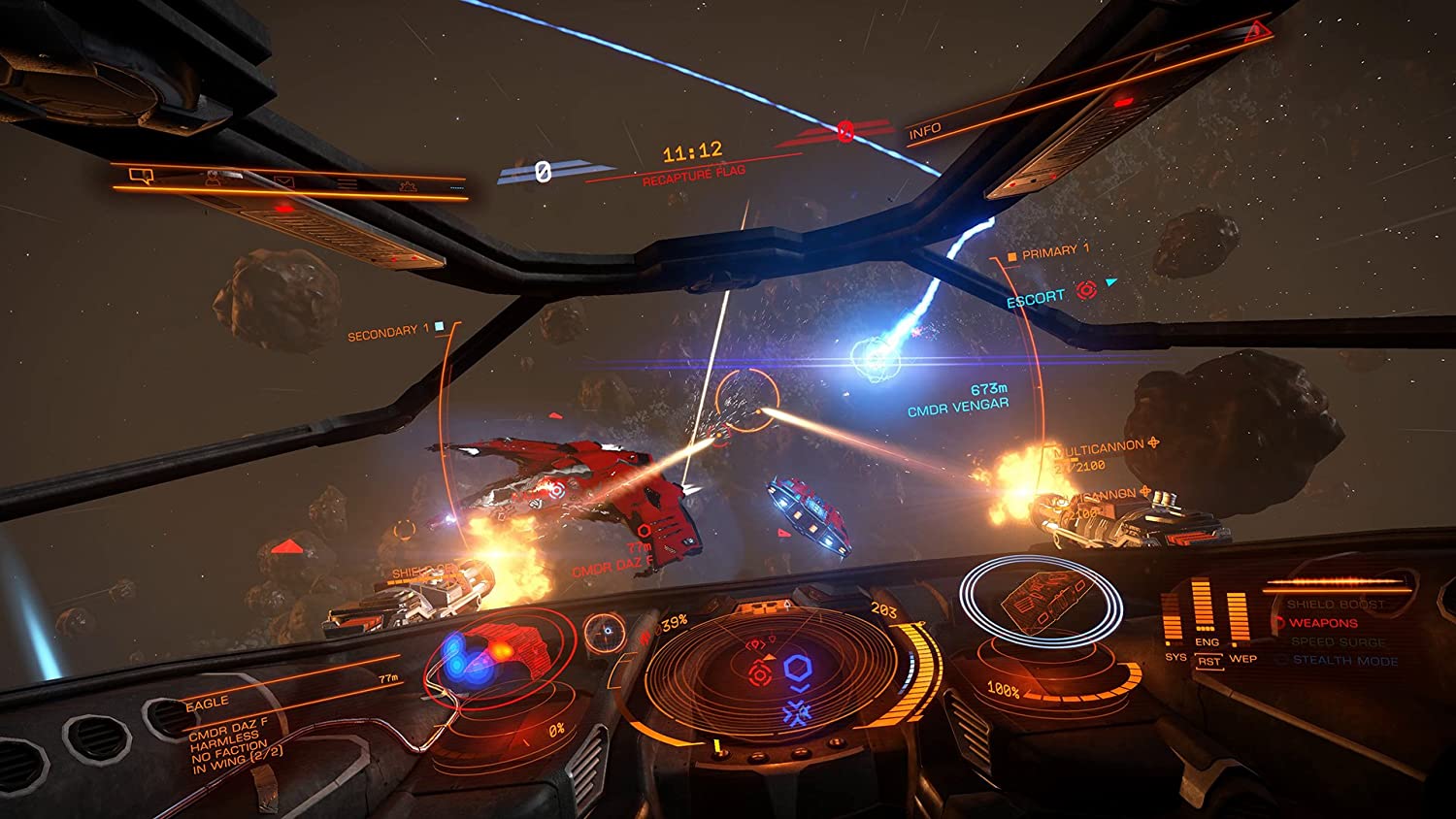
Imagine yourself strapped into the cockpit of a starship, gazing out at the inky blackness punctuated by the brilliant glow of distant stars. The hum of the engines vibrates through your very being as you prepare to embark on a journey to the far reaches of the galaxy. This is the promise of Elite Dangerous in VR, a space simulation experience that aims to deliver unparalleled immersion and scale. But does it truly achieve this lofty goal?
Many space sim enthusiasts crave that feeling of truly beingthere, inside their ship, exploring the vastness of space. However, some find the learning curve too steep, the initial setup daunting, or the performance less than stellar, hindering that crucial sense of presence. The dream of seamless VR space exploration sometimes clashes with the realities of hardware limitations and game optimization.
This review aims to explore the VR experience of Elite Dangerous, providing you with an honest assessment of its strengths and weaknesses. We'll delve into the visual fidelity, performance demands, gameplay enhancements, and overall sense of immersion to help you decide if this is the space exploration experience you've been waiting for.
In this article, we'll cover the core elements of Elite Dangerous VR, focusing on its immersive capabilities, performance considerations, and gameplay enhancements compared to the standard version. We'll share personal experiences, delve into the game's rich history and secrets, and provide recommendations for optimizing your VR setup. Plus, we'll offer tips and tricks for navigating the complexities of piloting a spaceship in virtual reality, followed by frequently asked questions for Elite Dangerous VR review.
First Impressions in VR
My first time booting up Elite Dangerous in VR was... well, it was a revelation. I'd spent countless hours playing the pancake version, but nothing could have prepared me for the sheer sense of scale and presence that VR brought to the experience. Suddenly, I wasn't just looking at a screen; I wasinsidemy ship, the Anaconda's bridge stretching out before me, all the glowing controls and readouts surrounding me. It felt incredibly real.
The initial setup, admittedly, took a little fiddling. Getting the graphics settings just right to maintain a smooth framerate without sacrificing too much visual detail was a balancing act. I spent a good hour tweaking various options, but once I found the sweet spot, the payoff was immense. Cruising through asteroid fields became a breathtaking ballet of dodging and weaving, the sense of danger amplified tenfold. The first time I jumped into hyperspace, the swirling vortex of light felt like I was actually being pulled through the fabric of reality. It's moments like these that solidify Elite Dangerous as one of the most impressive space simulation experiences available in VR.
Even simple tasks like docking at a space station become more engaging in VR. Lining up your approach, carefully managing your throttle, and feeling the gentle nudge as you slide into your designated bay—it's all so much more visceral and rewarding. The added depth perception makes judging distances easier, but also more crucial, as a miscalculation can lead to an embarrassing (and expensive) collision. Elite Dangerous in VR isn't just a different way to play the game; it's a fundamentally differentexperience.
What Makes Elite Dangerous VR Special?
Elite Dangerous VR takes an already expansive and immersive space simulation and elevates it to a whole new level. The key to its success lies in its ability to transport you directly into the cockpit of your chosen vessel. Suddenly, the vastness of space feels tangible, the controls become more intuitive, and the sense of danger is heightened.
Beyond the increased immersion, VR also enhances the gameplay in subtle but significant ways. For example, spatial awareness is greatly improved. Being able to physically look around the cockpit allows you to track targets, navigate asteroid fields, and monitor your surroundings with greater ease. The added depth perception makes judging distances more accurate, which is crucial for activities like docking, combat, and mining.
The scale of the game also becomes more apparent in VR. Planets feel truly massive, space stations loom large in the distance, and the vastness of the galaxy is brought into sharp focus. It's a truly awe-inspiring experience to witness the sheer scale of the Elite Dangerous universe from the perspective of a virtual space pilot. Elite Dangerous VR isn't just about seeing the game world; it's about feeling it.
History and Myth of VR Space Sims
The dream of experiencing space travel in virtual reality has been a long-standing aspiration for sci-fi enthusiasts and gamers alike. The earliest attempts at VR technology, while rudimentary, fueled the imagination and paved the way for future advancements. Games like Elite, released in 1984, laid the foundation for modern space simulation by offering open-world exploration and combat.
The rise of VR in recent years has provided the technology necessary to realize the full potential of space simulations. Games like EVE: Valkyrie and Star Citizen have experimented with VR integration, but Elite Dangerous has arguably offered the most complete and compelling experience. The game's attention to detail, combined with the immersive nature of VR, creates a sense of presence that is unmatched by traditional gaming.
Myths surrounding VR space sims often revolve around the idea of complete escapism – a seamless transition into another reality. While current technology isn't quite there yet, Elite Dangerous VR comes closer than most. The ability to lose yourself in the vastness of space, to feel the rumble of your engines, and to experience the thrill of exploration and combat is a powerful draw for anyone seeking a truly immersive gaming experience. Elite Dangerous VR embodies the long-held myth of being a space pilot, albeit a virtual one.
Hidden Secrets in the Elite Dangerous Galaxy (In VR!)
Elite Dangerous is already known for its vast and complex universe, filled with hidden secrets and unexplained phenomena. Experiencing these mysteries in VR adds another layer of intrigue and discovery.
Imagine stumbling upon a Guardian Structure for the first time, not just seeing it on a screen, but actually standing within its ruins in VR. The scale of these ancient structures is truly awe-inspiring, and the sense of wonder is amplified by the immersive nature of virtual reality. The same goes for encountering alien ships, like the Thargoids. The first time one interdicted me in VR, I nearly jumped out of my skin. Seeing that menacing, bio-mechanical ship loom over my cockpit was a truly terrifying and unforgettable experience.
Beyond the scripted encounters, the real hidden secrets of Elite Dangerous lie in its emergent gameplay. VR enhances these moments by allowing you to connect with the game on a deeper level. Whether you're exploring a newly discovered nebula, scavenging for rare materials on a remote planet, or engaging in a tense dogfight with a rival pilot, VR makes these experiences more visceral and memorable. The feeling of truly beingpresentin the Elite Dangerous universe makes the search for hidden secrets all the more rewarding.
Recommendations for the Optimal VR Experience
To truly enjoy Elite Dangerous in VR, a capable gaming PC is essential. Aim for a powerful graphics card (at least an RTX 2070 or equivalent) and a fast processor. 16GB of RAM is also recommended.
Experiment with different VR headsets to find one that offers the best balance of visual fidelity, comfort, and tracking accuracy. The Oculus Rift S, Valve Index, and HP Reverb G2 are all popular choices. Consider investing in a HOTAS (Hands On Throttle-And-Stick) setup. This will greatly enhance your immersion and control over your ship. Voice Attack is also a fantastic tool for controlling various ship functions with voice commands, further freeing up your hands and allowing you to focus on piloting.
Finally, take the time to optimize your in-game graphics settings. Start with the VR High preset and then tweak individual settings to find the sweet spot between visual quality and performance. Pay close attention to settings like supersampling, shadow quality, and ambient occlusion, as these can have a significant impact on framerate. With the right hardware and settings, Elite Dangerous in VR can be a truly breathtaking experience.
Diving Deeper into Performance Considerations
Elite Dangerous in VR, while incredibly immersive, is also demanding on your hardware. Maintaining a stable framerate is crucial for a comfortable and enjoyable experience, and dips in performance can lead to motion sickness. Understanding the key factors that affect performance is essential for optimizing your setup.
The graphics card is arguably the most important component. Elite Dangerous relies heavily on GPU power for rendering the complex environments, detailed ship models, and numerous visual effects. Aim for a card with ample VRAM (at least 8GB) to avoid texture pop-in and stuttering. CPU performance also plays a role, particularly in densely populated areas like stations and conflict zones. A faster processor can help to reduce CPU bottlenecks and improve overall framerate.
In addition to hardware, software optimization is also important. Make sure your graphics drivers are up to date and that you're using the latest version of the Oculus or Steam VR runtime. Experiment with different supersampling settings to find the best balance between visual clarity and performance. Lowering the rendering resolution can significantly improve framerate, but it will also result in a blurrier image. It's often better to lower other graphics settings, like shadows and ambient occlusion, before reducing the rendering resolution.
Tips and Tricks for Piloting in Virtual Reality
Piloting a spaceship in VR is a different beast than playing on a monitor. The increased immersion and spatial awareness can be both an advantage and a challenge. Here are a few tips to help you master the art of VR spaceflight in Elite Dangerous.
First, familiarize yourself with your ship's controls in VR. Spend some time in a safe environment, like a training simulation, practicing basic maneuvers and getting used to the layout of your cockpit. Use your head to look around and track targets. The ability to physically look around the cockpit is one of the biggest advantages of VR, so make the most of it. Don't rely solely on your radar; use your eyes to scan the environment for threats and points of interest.
Pay attention to your orientation. It's easy to get disoriented in VR, especially during intense combat maneuvers. Use your ship's instruments to maintain your bearings and avoid spinning out of control. Take breaks when needed. VR can be tiring, especially during long play sessions. Step away from the game periodically to avoid eye strain and motion sickness. Elite Dangerous VR is an amazing experience, but it's important to take care of yourself while playing.
Mastering the Art of Combat in VR
Combat in Elite Dangerous VR is a thrilling and intense experience. The added immersion and spatial awareness can give you a significant edge, but it also requires a different approach than traditional gameplay. Using your head tracking to its full potential is paramount. You can target ships by just looking at them.
Practice your aiming in VR. The added depth perception can make it easier to lead your targets, but it also requires some adjustment. Experiment with different aiming techniques to find what works best for you. Managing your energy is critical during combat. Use your capacitor to balance power between weapons, engines, and shields. Knowing when to divert power to each system can be the difference between victory and defeat.
Utilize the environment to your advantage. Asteroid fields and planetary rings can provide cover and concealment, allowing you to ambush your enemies or evade incoming fire. Don't be afraid to use dirty tactics. Ramming, silent running, and chaff launchers can all be effective ways to disrupt your opponent and gain an advantage. Elite Dangerous VR combat is all about skill, strategy, and a little bit of luck.
Fun Facts About Elite Dangerous (and VR!)
Did you know that Elite Dangerous features a fully simulated Milky Way galaxy, with over 400 billion star systems? Exploring this vast universe in VR is a truly awe-inspiring experience.
The game's sound design is incredibly detailed, with realistic engine noises, weapon effects, and environmental sounds. In VR, these sounds become even more immersive, adding to the sense of presence. Elite Dangerous has a dedicated community of players who are constantly discovering new secrets and sharing their experiences. In VR, these community interactions become even more personal and engaging.
The development of Elite Dangerous was funded through a Kickstarter campaign, which raised over £1.5 million. The success of this campaign demonstrated the strong demand for a modern space simulation game. Elite Dangerous VR is a testament to the power of virtual reality to transport us to other worlds and immerse us in new experiences. It's a game that truly lives up to the promise of VR gaming.
How to Get Started with Elite Dangerous VR
Getting started with Elite Dangerous in VR can seem daunting, but it's actually quite straightforward. First, you'll need to purchase the game from Steam or the Frontier Store. Make sure you have a VR headset that is compatible with the game. The Oculus Rift S, Valve Index, and HP Reverb G2 are all popular choices. Once you've installed the game, launch it through Steam VR or the Oculus runtime.
From the main menu, select "VR Mode" to enable virtual reality. You may need to adjust your in-game graphics settings to optimize performance. Start with the VR High preset and then tweak individual settings as needed. Consider investing in a HOTAS (Hands On Throttle-And-Stick) setup for enhanced immersion and control. Voice Attack is also a useful tool for controlling various ship functions with voice commands.
Start with the training missions to familiarize yourself with the game's controls and mechanics. Once you're comfortable, you can start exploring the galaxy and pursuing your own objectives. Elite Dangerous VR is a vast and complex game, but with a little patience and persistence, you'll be soaring through the stars in no time.
What If Elite Dangerous Never Added VR Support?
If Elite Dangerous had never added VR support, the space simulation landscape would be significantly different. The game's potential for immersion and realism would have remained untapped, and players would have missed out on a truly transformative experience.
Other VR space sims might have risen to fill the void, but it's unlikely that they would have achieved the same level of polish and depth as Elite Dangerous. The game's vast universe, detailed ship models, and realistic flight mechanics are perfectly suited for VR. Without VR support, Elite Dangerous would have remained a great game, but it wouldn't have achieved its full potential as a truly immersive and unforgettable space simulation.
The addition of VR support has not only enhanced the Elite Dangerous experience but has also helped to push the boundaries of VR gaming in general. It has shown what is possible when a well-designed game is combined with the power of virtual reality. Elite Dangerous VR is a shining example of the potential of VR to transport us to other worlds and immerse us in new experiences.
Top 5 Reasons to Play Elite Dangerous in VR
1. Unparalleled Immersion: Experience the vastness of space like never before. The VR view places you directly into the cockpit for the ultimate space sim experience.
2. Enhanced Spatial Awareness: Easily track targets and navigate complex environments with natural head movements.
3. Improved Depth Perception: Accurately judge distances for precise docking, combat, and mining maneuvers.
4. Awe-Inspiring Scale: Witness the true size of planets, space stations, and the galaxy itself.
5. Enhanced Gameplay: Subtly enhanced gameplay mechanics make the game much more enjoyable than playing it regularly.
Frequently Asked Questions
Q: What are the minimum PC specs for Elite Dangerous VR?
A: You'll need at least an Intel i5-4590/AMD FX 8350 processor, 8GB of RAM, and an NVIDIA GTX 970/AMD R9 290 graphics card. However, for a smoother experience, a more powerful system is recommended.
Q: Which VR headsets are compatible with Elite Dangerous?
A: Elite Dangerous supports most PC VR headsets, including the Oculus Rift S, Valve Index, and HP Reverb G2.
Q: Can I use a HOTAS with Elite Dangerous VR?
A: Yes, using a HOTAS (Hands On Throttle-And-Stick) is highly recommended for enhanced immersion and control.
Q: Is Elite Dangerous VR prone to motion sickness?
A: Some players may experience motion sickness, especially when performing rapid maneuvers. Experiment with graphics settings and take breaks as needed to minimize discomfort.
Conclusion of Elite Dangerous VR Review
Elite Dangerous in VR is a truly remarkable experience that elevates the already impressive space simulation to new heights. The unparalleled immersion, enhanced spatial awareness, and improved depth perception combine to create a sense of presence that is unmatched by traditional gaming. While the game is demanding on hardware and may require some tweaking to optimize performance, the payoff is well worth the effort. If you're a space sim enthusiast looking for the ultimate VR experience, Elite Dangerous is a must-play. It's a game that will transport you to another world and leave you with memories that will last a lifetime.
Post a Comment