Valve Index Gaming Review: Premium PC VR Gaming Experience
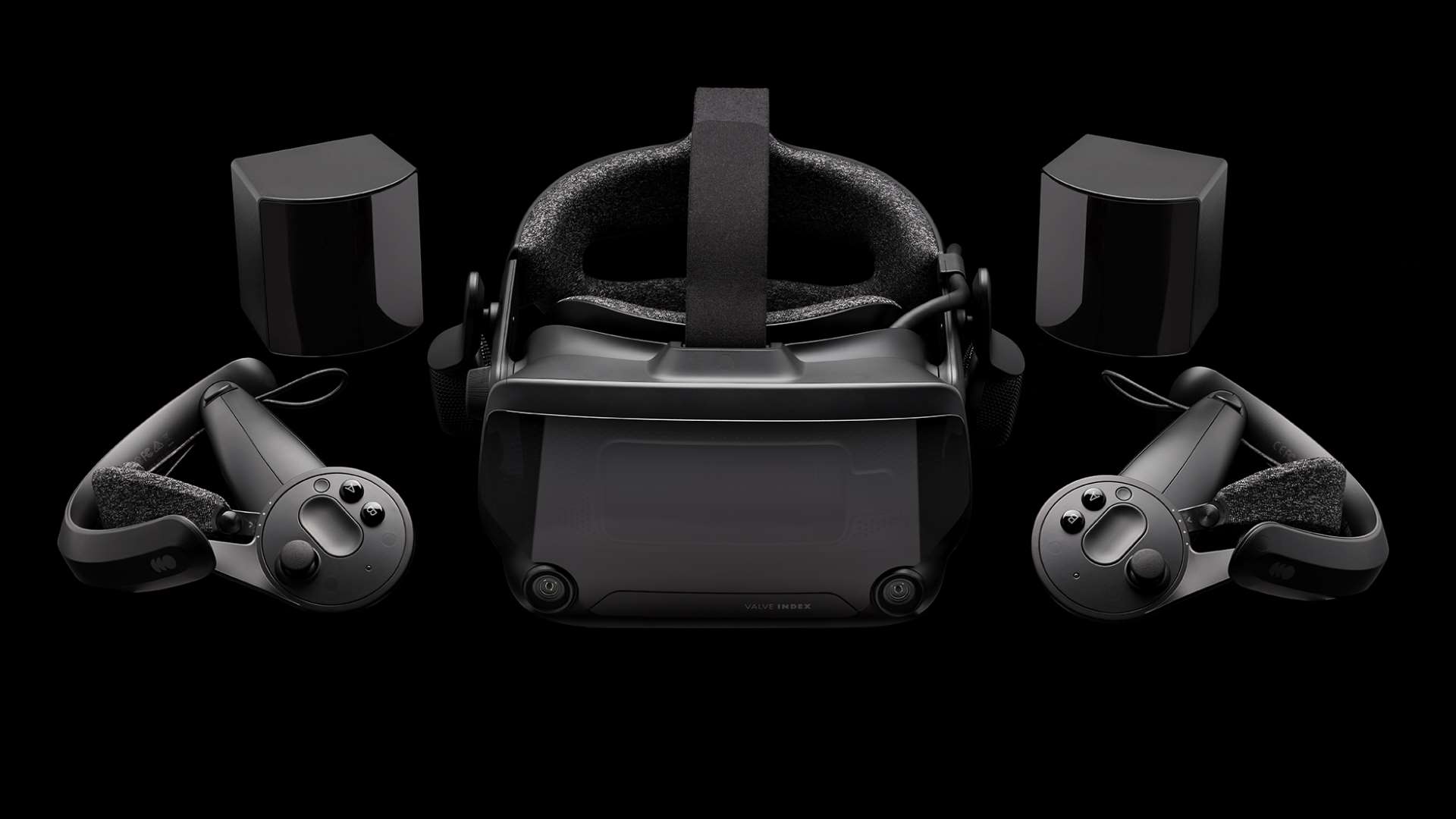
Ready to dive into the most immersive PC VR experience available? The Valve Index promises to deliver just that, and we're here to break down whether it lives up to the hype. Prepare for a deep dive into its features, performance, and overall value, because the world of virtual reality is about to get a whole lot clearer.
Stepping into high-end VR can sometimes feel like navigating a minefield. Will the resolution be sharp enough? Will the tracking keep up with my movements? And perhaps most importantly, will my wallet survive the ordeal? These are all legitimate concerns when considering a significant investment in a VR headset.
This review aims to provide a comprehensive look at the Valve Index, focusing on its strengths and weaknesses to help you determine if it's the right choice for your VR needs. We'll cover everything from the headset's display and audio to the innovative "knuckles" controllers and the overall gaming experience. We will tell you everything you need to know before buying into the Valve ecosystem.
The Valve Index presents a compelling high-end PC VR experience, boasting impressive visuals, exceptional tracking, and innovative controllers that offer a unique level of interactivity. However, the high price point and the need for a powerful PC are significant factors to consider. Ultimately, the Index stands as a top-tier option for VR enthusiasts seeking the best possible immersion, provided they're willing to invest in the necessary hardware.
My First Time with the Valve Index
My initial experience with the Valve Index was nothing short of breathtaking. I'd tried other VR headsets before, but the Index's clarity and field of view were immediately noticeable. I remember loading up Half-Life: Alyx for the first time, and the level of detail in the environments was astonishing. I felt truly present in that world, exploring every corner and interacting with objects in a way that felt incredibly natural.
The "knuckles" controllers, now officially known as Valve Index Controllers, were the real game-changer. Being able to naturally grip and manipulate objects with individual finger tracking added a whole new dimension to the experience. Simple actions like picking up a bottle or reaching out to touch a wall felt incredibly intuitive. This level of immersion is what truly sets the Valve Index apart from other VR headsets.
The audio quality was equally impressive. The off-ear headphones provided a clear and directional soundscape that further enhanced the sense of presence. I could hear enemies creeping up behind me, and the environmental audio added a layer of realism that I hadn't experienced before in VR. The Index really delivers on the promise of a premium and immersive VR experience.
What Makes the Valve Index a Premium VR Experience?
The Valve Index earns its "premium" title through a combination of cutting-edge hardware and thoughtful design. Several factors contribute to this status. The headset itself boasts high-resolution LCD panels with a fast refresh rate, resulting in exceptionally clear and smooth visuals, minimizing screen-door effect and motion blur. It also has a wider field of view than many competitors, enhancing immersion.
Beyond the display, the Valve Index Controllers are a major draw. Their individual finger tracking allows for incredibly natural and intuitive interactions with the virtual world. These controllers can sense the position of each of your fingers, enabling you to grab, throw, and manipulate objects with a degree of precision that wasn't possible with previous VR controllers. The base stations which provide very high accuracy tracking of the headset and controllers are also a major part of the formula.
The Index also offers excellent audio quality with its off-ear headphones. These headphones provide immersive sound without completely blocking out external noise, allowing you to maintain a sense of awareness of your surroundings. This design choice enhances comfort and reduces the feeling of isolation that can sometimes occur with fully enclosed headphones. Ultimately, the combination of these features creates a truly premium and immersive VR experience.
The History and Mythology of Valve Index
The Valve Index represents Valve's second major foray into the VR hardware space, following their collaboration with HTC on the original HTC Vive. But unlike the Vive, the Index was designed and manufactured entirely by Valve, signaling their commitment to driving innovation in the VR industry. The headset launched in 2019 and was quickly lauded for its advanced features and impressive performance.
The Valve Index Controllers, initially codenamed "Knuckles," generated considerable hype in the years leading up to the Index's release. Leaks and prototypes circulated online, showcasing the controllers' unique finger-tracking capabilities. The final product lived up to the expectations, offering a level of interactivity that was previously unheard of in VR gaming.
Some consider the Valve Index to be a flagship for PC VR gaming, demonstrating the potential of high-end VR hardware and software. It's become a benchmark for other VR headset manufacturers, pushing the boundaries of what's possible in virtual reality. The Valve Index remains a prominent player in the VR landscape, inspiring new innovations and shaping the future of the industry.
Hidden Secrets of the Valve Index
One of the lesser-known features of the Valve Index is its modular design. The face gasket, for instance, can be easily removed and replaced, allowing for customization and hygiene. Aftermarket companies have even developed alternative face gaskets that can improve comfort or field of view.
The Index also features a front-facing USB port, which can be used to power accessories such as eye-tracking modules or haptic feedback devices. This opens up a world of possibilities for expanding the functionality of the headset and creating even more immersive VR experiences.
Another hidden gem is the Steam VR Workshop, where users can create and share custom controller bindings for various VR games. This allows you to tailor the Index Controllers to your individual preferences and optimize your gameplay experience. These seemingly small details contribute to the overall versatility and appeal of the Valve Index.
Recommendations for Valve Index Owners
If you're a Valve Index owner, investing in a few accessories can significantly enhance your VR experience. A comfortable head strap is essential for long gaming sessions, as the default strap can sometimes cause discomfort. There are several aftermarket options available that offer improved ergonomics and weight distribution.
Consider purchasing a VR cable management system to keep the headset cable out of your way. These systems typically involve suspending the cable from the ceiling, preventing it from tangling or getting caught on furniture. This can greatly improve your freedom of movement and reduce the risk of tripping.
Explore the vast library of VR games and experiences available on Steam VR. From immersive storytelling adventures to fast-paced action games, there's something for everyone. Don't be afraid to experiment with different genres and find what you enjoy most. Games like "Half-Life: Alyx", "Boneworks", and "Beat Saber" are all great titles to showcase the Valve Index's capabilities.
Troubleshooting Common Valve Index Issues
Like any complex piece of technology, the Valve Index can sometimes encounter issues. One common problem is tracking loss, where the headset or controllers momentarily lose their position in the virtual world. This can be caused by a variety of factors, such as obstructed base stations, reflective surfaces, or low battery levels.
If you're experiencing tracking loss, make sure that your base stations are properly positioned and have a clear line of sight to your play area. Avoid placing reflective objects, such as mirrors or windows, within the tracking volume. Ensure that your controllers are fully charged and that you're using the latest Steam VR drivers.
Another common issue is image distortion or blurriness. This can be caused by incorrect IPD settings, a dirty headset lens, or a loose cable connection. Make sure that you've adjusted the IPD (interpupillary distance) setting on the headset to match your own IPD. Clean the headset lenses with a microfiber cloth and check that all cables are securely connected.
Tips for Maximizing Your Valve Index Experience
To truly maximize your Valve Index experience, consider tweaking the Steam VR settings to optimize performance and visual quality. Experiment with different resolution settings and refresh rates to find the sweet spot for your PC's hardware. Lowering the resolution can improve performance, while increasing the refresh rate can reduce motion blur.
Take advantage of the Index Controllers' individual finger tracking capabilities. Practice using different hand gestures and grips to interact with objects in the virtual world. This can greatly enhance the sense of immersion and make your VR experiences feel more natural.
Don't be afraid to experiment with different VR games and experiences. The Valve Index is capable of delivering a wide range of immersive and engaging experiences, from intense combat simulations to relaxing exploration games. Try something new and discover the full potential of your VR headset.
Understanding the Valve Index's Technical Specifications
The Valve Index boasts impressive technical specifications that contribute to its high-quality VR experience. The headset features dual 1440 x 1600 LCD panels, providing a sharp and clear image. The displays have a refresh rate of up to 120Hz, with an experimental 144Hz mode available, which significantly reduces motion blur and enhances immersion.
The headset's field of view is approximately 130 degrees, which is wider than many other VR headsets on the market. This wider field of view allows you to see more of the virtual world at once, further enhancing the sense of presence. The Valve Index also features integrated headphones that provide high-fidelity audio.
The Valve Index Controllers utilize advanced sensor technology to track the position and movement of each of your fingers. This allows for incredibly precise and natural interactions with the virtual world. The controllers also feature haptic feedback, providing tactile sensations that enhance immersion.
Fun Facts About the Valve Index
Did you know that the Valve Index Controllers can be used without the headset? They can function as standalone input devices, allowing you to control your PC with hand gestures. While this functionality is still in its early stages, it demonstrates the potential for innovative applications beyond VR gaming.
The Valve Index was originally codenamed "Aloha" during its development. This code name was kept secret for a long time, and it wasn't revealed until after the headset's official announcement. Another little-known fact is that the Valve Index Controllers have a built-in pressure sensor that can detect how hard you're gripping them. This information can be used to create more realistic and nuanced interactions in VR games.
The Valve Index's base stations use laser tracking technology to precisely track the position of the headset and controllers. This technology is similar to what's used in industrial robotics, and it's what allows the Index to achieve such high levels of accuracy and responsiveness.
How to Set Up Your Valve Index
Setting up the Valve Index can seem daunting at first, but it's a relatively straightforward process. Start by connecting the base stations to power outlets and positioning them in opposite corners of your play area. Ensure that the base stations have a clear line of sight to each other and to your play space.
Next, connect the headset to your PC using the included cables. You'll need to connect the Display Port cable to your graphics card and the USB cable to a USB port on your computer. Download and install the Steam VR software from Steam. Once Steam VR is installed, it will guide you through the remaining setup steps.
Follow the on-screen instructions to calibrate the base stations and configure your play area. You'll also need to adjust the IPD (interpupillary distance) setting on the headset to match your own IPD. Once you've completed these steps, your Valve Index should be ready to use.
What If the Valve Index Isn't Working?
If you encounter issues with your Valve Index, there are several troubleshooting steps you can take. First, ensure that all cables are securely connected and that your PC meets the minimum system requirements for VR gaming. Check that your graphics card drivers are up to date and that you're using the latest version of Steam VR.
If you're experiencing tracking issues, try restarting the base stations and the headset. Make sure that the base stations have a clear line of sight to each other and to your play area. Avoid placing reflective objects within the tracking volume.
If you're still having problems, consult the Steam VR support documentation or contact Valve support for assistance. They can provide more specific troubleshooting steps based on the nature of your issue.
Top 5 Reasons to Buy the Valve Index
1. Unparalleled Immersion: The Valve Index offers a level of immersion that's unmatched by other VR headsets, thanks to its high-resolution displays, wide field of view, and exceptional audio quality.
2. Revolutionary Controllers: The Valve Index Controllers' individual finger tracking allows for incredibly natural and intuitive interactions with the virtual world.
3. High Refresh Rate: The headset's high refresh rate (up to 144Hz) reduces motion blur and enhances visual clarity, resulting in a smoother and more comfortable VR experience.
4. Modular Design: The Valve Index's modular design allows for customization and expansion, with support for accessories such as eye-tracking modules and haptic feedback devices.
5. Excellent Tracking: The headset's base station tracking system provides precise and reliable tracking, ensuring that your movements are accurately translated into the virtual world.
Question and Answer
Q: What are the minimum PC specifications required to run the Valve Index?
A: The minimum requirements include a dual-core CPU, 8GB of RAM, and a NVIDIA Ge Force GTX 970 or AMD RX480 graphics card.
Q: How much does the Valve Index cost?
A: The full kit, including the headset, controllers, and base stations, typically retails for around $1000.
Q: What is the field of view of the Valve Index?
A: The Valve Index has a field of view of approximately 130 degrees, which is wider than many other VR headsets.
Q: Can I use the Valve Index with glasses?
A: Yes, the Valve Index is designed to accommodate most glasses. However, you may need to adjust the headset's facial interface to ensure a comfortable fit.
Conclusion of Valve Index Gaming Review: Premium PC VR Gaming Experience
Post a Comment